20. Clipboard
Gtk.Clipboard provides a storage area for a variety of data, including
text and images. Using a clipboard allows this data to be shared between
applications through actions such as copying, cutting, and pasting.
These actions are usually done in three ways: using keyboard shortcuts,
using a Gtk.MenuItem, and connecting the functions to
Gtk.Button widgets.
There are multiple clipboard selections for different purposes.
In most circumstances, the selection named CLIPBOARD is used for everyday
copying and pasting. PRIMARY is another common selection which stores text
selected by the user with the cursor.
20.1. Example
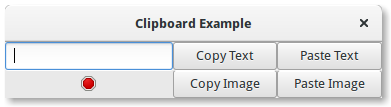
 1import gi
 2
 3gi.require_version("Gtk", "3.0")
 4from gi.repository import Gtk, Gdk
 5
 6
 7class ClipboardWindow(Gtk.Window):
 8    def __init__(self):
 9        super().__init__(title="Clipboard Example")
10
11        grid = Gtk.Grid()
12
13        self.clipboard = Gtk.Clipboard.get(Gdk.SELECTION_CLIPBOARD)
14        self.entry = Gtk.Entry()
15        self.image = Gtk.Image.new_from_icon_name("process-stop", Gtk.IconSize.MENU)
16
17        button_copy_text = Gtk.Button(label="Copy Text")
18        button_paste_text = Gtk.Button(label="Paste Text")
19        button_copy_image = Gtk.Button(label="Copy Image")
20        button_paste_image = Gtk.Button(label="Paste Image")
21
22        grid.add(self.entry)
23        grid.attach(self.image, 0, 1, 1, 1)
24        grid.attach(button_copy_text, 1, 0, 1, 1)
25        grid.attach(button_paste_text, 2, 0, 1, 1)
26        grid.attach(button_copy_image, 1, 1, 1, 1)
27        grid.attach(button_paste_image, 2, 1, 1, 1)
28
29        button_copy_text.connect("clicked", self.copy_text)
30        button_paste_text.connect("clicked", self.paste_text)
31        button_copy_image.connect("clicked", self.copy_image)
32        button_paste_image.connect("clicked", self.paste_image)
33
34        self.add(grid)
35
36    def copy_text(self, widget):
37        self.clipboard.set_text(self.entry.get_text(), -1)
38
39    def paste_text(self, widget):
40        text = self.clipboard.wait_for_text()
41        if text is not None:
42            self.entry.set_text(text)
43        else:
44            print("No text on the clipboard.")
45
46    def copy_image(self, widget):
47        if self.image.get_storage_type() == Gtk.ImageType.PIXBUF:
48            self.clipboard.set_image(self.image.get_pixbuf())
49        else:
50            print("No image has been pasted yet.")
51
52    def paste_image(self, widget):
53        image = self.clipboard.wait_for_image()
54        if image is not None:
55            self.image.set_from_pixbuf(image)
56
57
58win = ClipboardWindow()
59win.connect("destroy", Gtk.main_quit)
60win.show_all()
61Gtk.main()